Skip to content

WorkPro AI

The AI CRM that does the data entry for you

Tell WorkPro what happened in plain language — or just say it — and it drafts the activity, task or contact for you to confirm. Then let it plan your day and route your visits.

opens Ask AI from anywhere in WorkPro
⌘J
opens Ask AI from anywhere in WorkPro
planning styles, from Balanced to Eat The Frog
4
planning styles, from Balanced to Eat The Frog
of AI changes wait for a person to confirm
100%
of AI changes wait for a person to confirm

Ask AI

Ask anything. Log anything. In plain language.

Ask “which of my accounts in Burbank haven’t been visited in 60 days?” or say “log a visit to Albright Memorial — met Colette about the STAT delivery program, she wants pricing by Friday.” Ask AI knows the record you’re on, so “log a call with them” just works.

  • Type, or tap the microphone and ask with your voice
  • Drafts contacts, tasks and activity logs as editable cards
  • Nothing changes until you confirm — one card or all of them
  • Can look a new business up on Google to fill in its address and phone
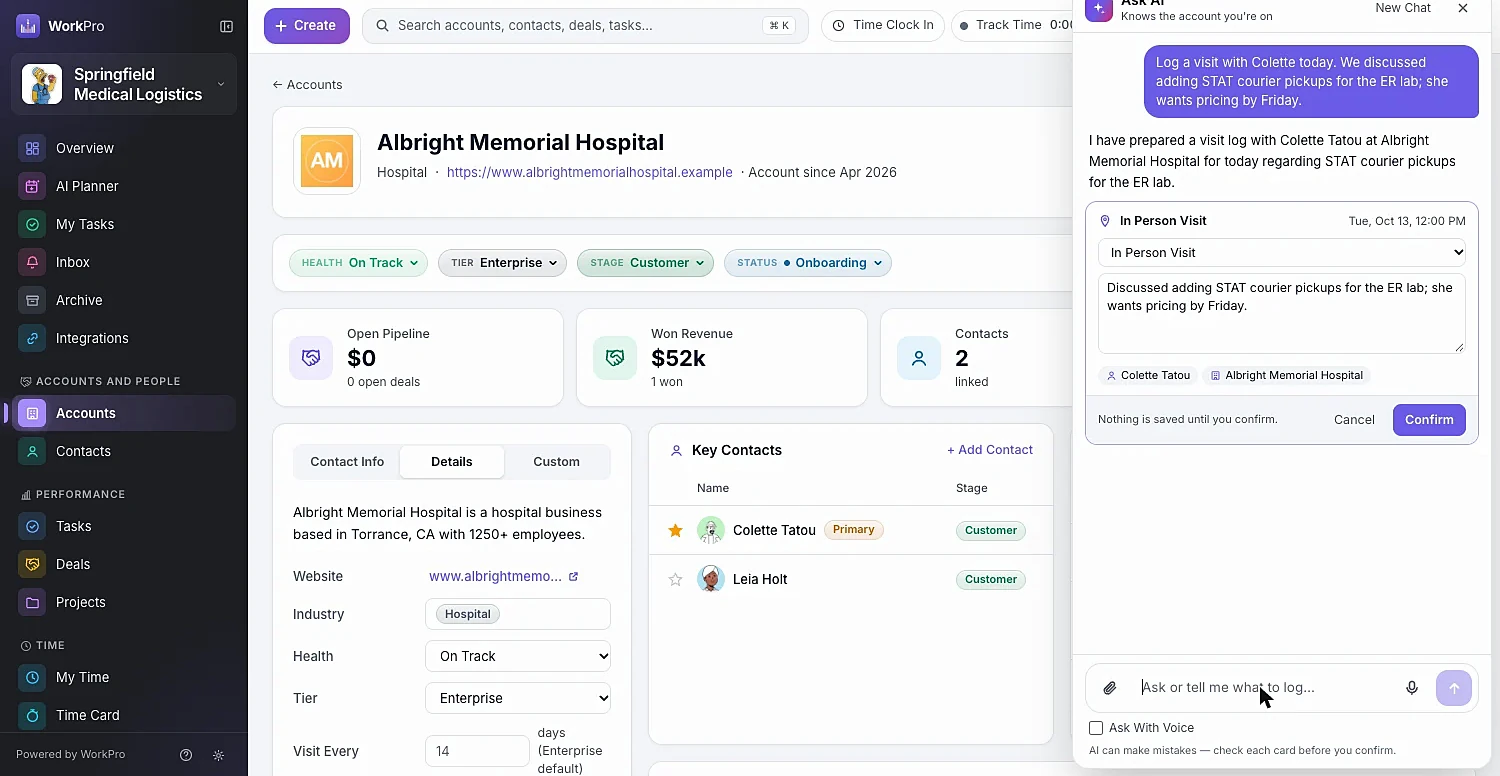
Ask AI showing a prepared in-person visit as an editable card with Confirm and Cancel

Plan My Day

Your tasks and meetings, planned into time blocks

Plan My Day reads your open tasks — due dates, priorities and estimates — and your calendar, then lays out the day on a timeline with Happening Now and Up Next. Every task shows its impact score and why it was chosen.

  • Four styles: Balanced, Deadline First, Eat The Frog and Top Six
  • Lock In a block so it stays put when you re-plan
  • Set your day, lunch, buffers around meetings and focus mornings
  • Plan Tomorrow before you log off

Plan My Visits

A timed route through the accounts that need you most

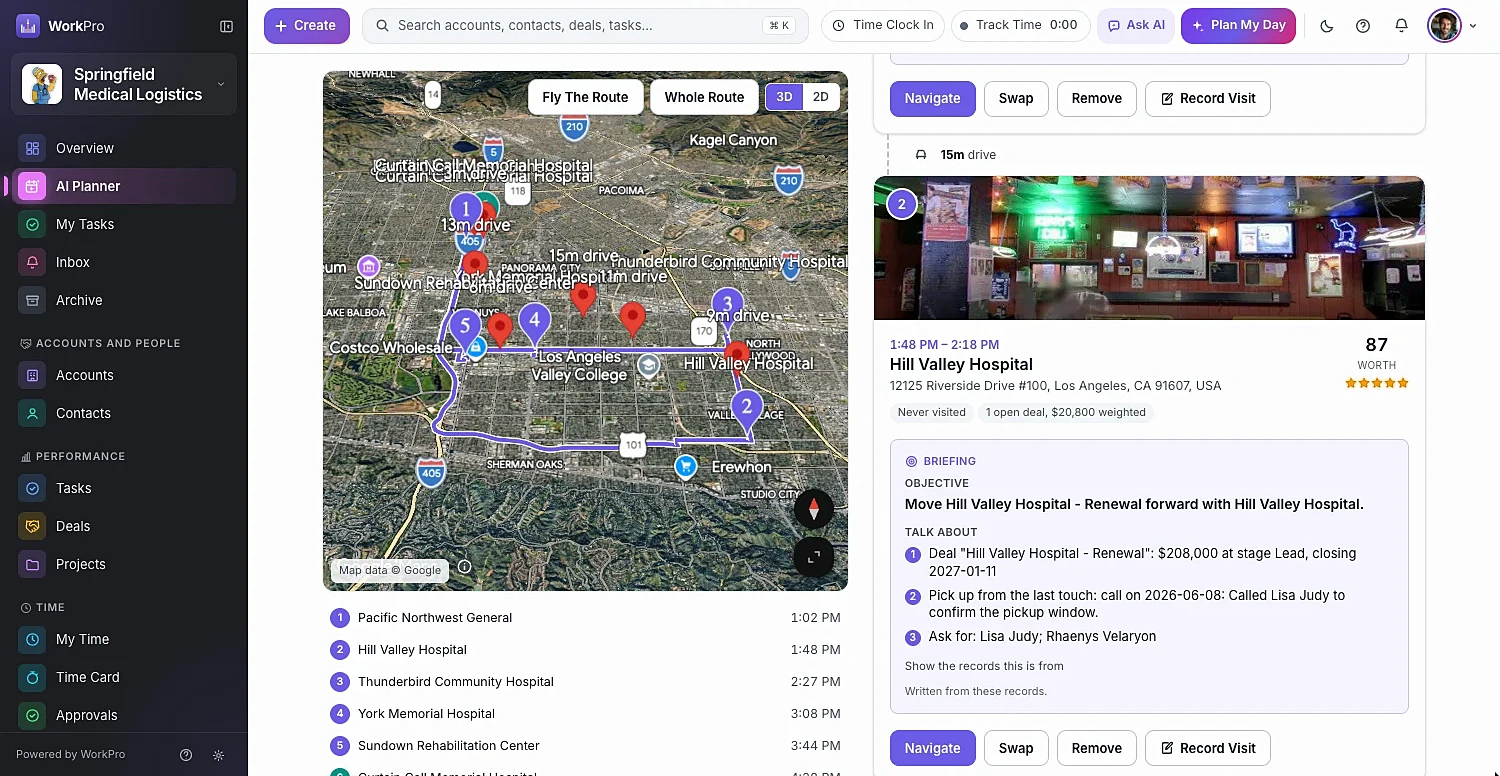
Plan My Visits picks the accounts most worth visiting — overdue, with open deals, or at risk — orders them into a driving route around your calendar and customers’ visiting hours, and writes an objective and talking points for each stop from the account’s own history.

  • Must-visit stops, a lunch break and minutes per visit
  • Street View photo, drive time and a Worth score for every stop
  • Swap in a suggested alternative with one click
  • Share with teammates or send to your phone with a QR code
A planned visit route on a map with an AI briefing for each stop

Research & capture

Business cards and web research, straight into your CRM

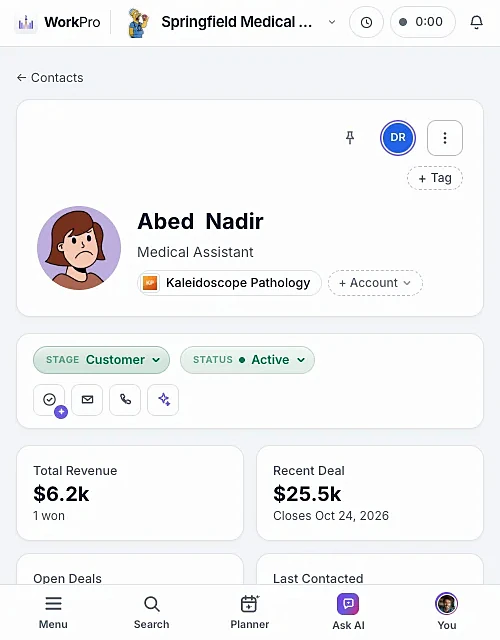
Snap a photo of a business card and WorkPro turns it into a contact — and an account, if the company is new — or fills in details an existing contact is missing. On any account, AI research suggests details and people who work there, ready to add in one click.

  • Scan a business card from your phone’s camera
  • Suggested company details and key people from the public web
  • Brief Me gives you a visit briefing on any record
  • Record Activity from the side pane in seconds
A WorkPro contact page on a phone

Capabilities

AI where it saves time — with a person in charge

WorkPro AI is built into the records you already use, not bolted on as a separate chatbot.

  • Context-aware

    Open an account and Ask AI already knows which one you mean.

  • Confirm before it saves

    Every proposed change is a card you can edit, confirm or cancel.

  • Voice input

    Ask With Voice — perfect for logging a visit from the car park.

  • Calendar-aware planning

    Connect Google Calendar and plans work around your real meetings.

  • Visit cadence by tier

    Set how often each tier should be visited; overdue accounts rise to the top.

  • Business card scanning

    A photo becomes a contact and, if needed, a new account.

  • Web research

    Suggested details and people for accounts and contacts.

  • 3D route flyover

    Fly The Route before you drive it, then navigate stop by stop.

  • Enterprise AI platform

    WorkPro AI runs on Google’s Vertex AI platform.

Better together

It all runs on the same records

Every WorkPro module shares your accounts, contacts and deals — so the work flows from one to the next.

FAQ

AI Assistant questions

Straight answers about what WorkPro does today. Can’t find yours? Ask us during a demo.

What can WorkPro’s AI assistant do?

Ask AI answers questions about your accounts, contacts, deals and tasks, and drafts new contacts, tasks and activity logs from plain language or voice. It knows which record you’re looking at, can look up a new business on Google, scans business cards, and suggests account details and people from public web research.

Will the AI change my data without asking?

No. Every change Ask AI proposes appears as a card you can edit. Nothing is saved until you confirm it.

How does Plan My Day choose what to work on?

It reads your open tasks — due dates, priorities and estimates — and your calendar, then plans the day using the style you choose: Balanced, Deadline First, Eat The Frog or Top Six. Each task shows its impact score and the reason it was chosen.

Which AI model does WorkPro use?

WorkPro’s AI features run on Google Gemini through Google Cloud’s Vertex AI platform.

Does WorkPro have AI workflow automation?

Today WorkPro’s AI focuses on the assistant, day planning, visit route planning, briefings, business-card scanning and research. Ask us about what’s on the roadmap during a demo.

How do I get WorkPro AI?

The AI module is turned on for your workspace by the WorkPro team. Book a demo and we’ll walk you through it.

Run your whole business from one app

See WorkPro with your own pipeline, projects and invoices in a 30-minute walkthrough. We’ll help you import your data, too.